NEW 6.1Animation Workshop 2.0 · Every brush · Shapes, text & effectsเวิร์กช็อปแอนิเมชัน 2.0 · แปรงครบทุกแบบ · รูปทรง ข้อความ และเอฟเฟกต์

Draw it.
Animate it.
Build it in 3D.
วาดเลย
ทำให้เคลื่อนไหว
สร้างในโลก 3D

MasterSketch Studio is a free creative studio for every device. Paint with 100+ brushes, make cartoons frame by frame with your own sounds, build 3D worlds you can fly through and play – and share it all with everyone.MasterSketch Studio คือสตูดิโอสร้างสรรค์ฟรีสำหรับทุกอุปกรณ์ วาดด้วยแปรงกว่า 100 แบบ ทำการ์ตูนทีละเฟรมพร้อมเสียงของคุณเอง สร้างโลก 3D ที่บินเที่ยวและเล่นเกมได้ แล้วแชร์ให้ทุกคนดู

Free · no account · works offlineฟรี · ไม่ต้องสมัคร · ใช้ออฟไลน์ได้
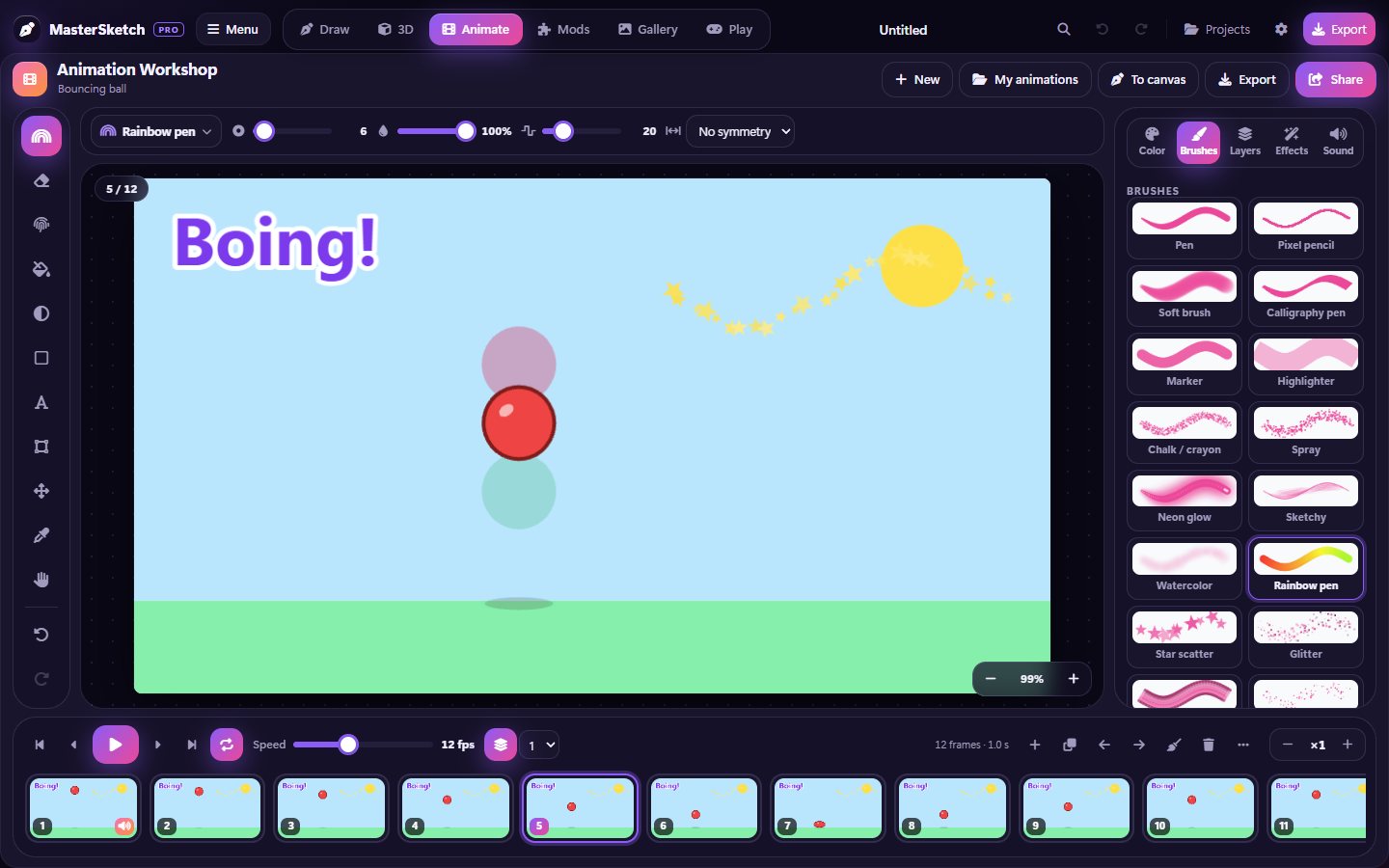
The Animation Workshop in MasterSketch 6.1: a bouncing ball with onion skin, a title on the front layer and every brush from the drawing canvas
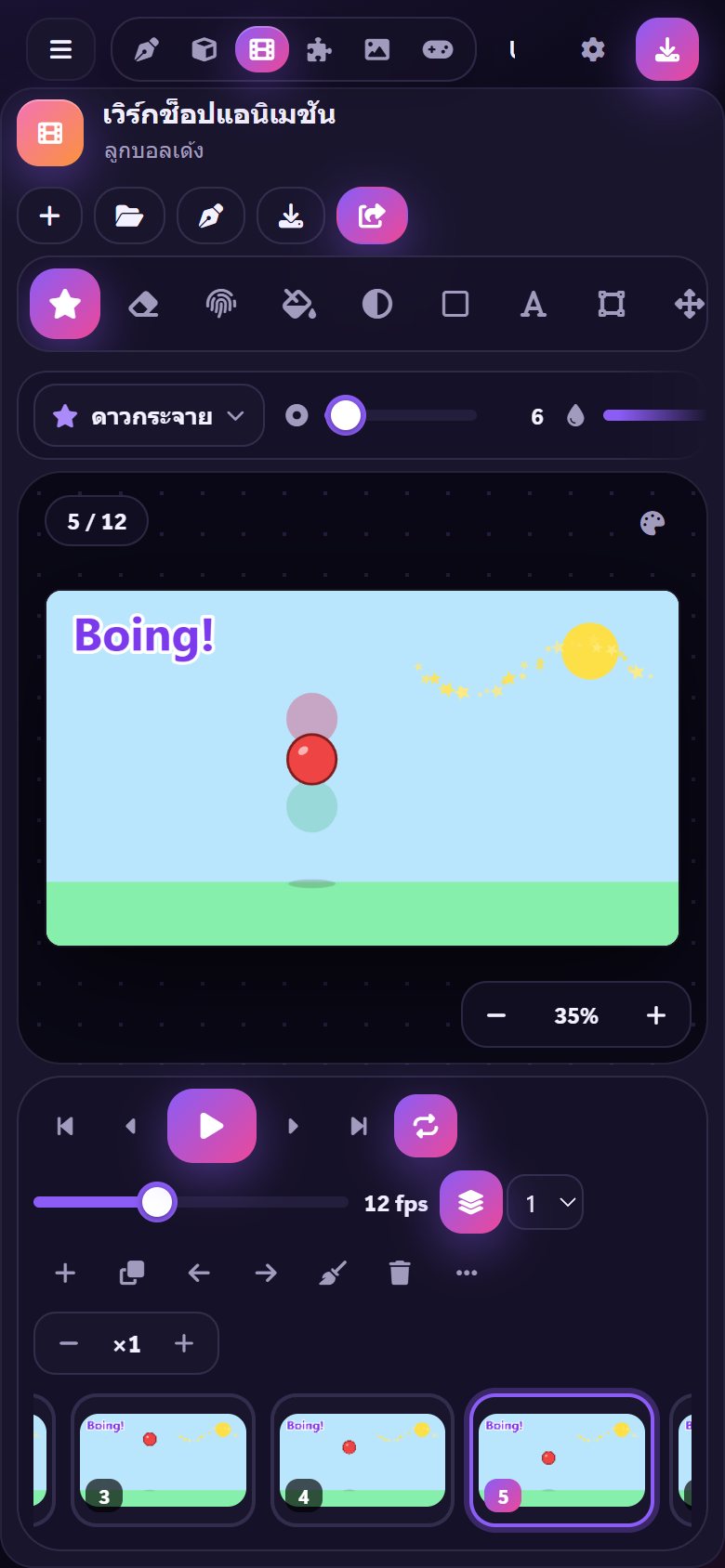
The Animation Workshop on a phone, in Thai
🎬Animation Workshopเวิร์กช็อปแอนิเมชัน
✈️Fly with W A S Dบินด้วย W A S D
🏁13 game levelsเกม 13 ด่าน
AndroidiPad & iPhoneWindowsMacAny web browserทุกเบราว์เซอร์
✦ Everything in one appครบในแอปเดียว

Six studios. One place to create.6 สตูดิโอ ในที่เดียว

✏️

Drawวาดภาพ

Layers, 100+ brushes, stamps, coloring pages, step-by-step lessons and a daily drawing challenge.เลเยอร์ แปรงกว่า 100 แบบ ตัวปั๊ม หน้าระบายสี บทเรียนวาดทีละขั้น และภารกิจวาดภาพประจำวัน

NEW
🎬

Animateแอนิเมชัน

Draw frame by frame with onion skin, add sound effects, your voice or music, and export a video or GIF.วาดทีละเฟรมด้วยออนเนียนสกิน ใส่เสียงเอฟเฟกต์ เสียงพูด หรือเพลง แล้วส่งออกเป็นวิดีโอหรือ GIF

🧊

3D Studioสตูดิโอ 3D

Build models from shapes, pose figures, make things spin and wave – then fly through your world with W A S D.สร้างโมเดลจากรูปทรง จัดท่าตัวละคร ทำให้หมุนและโบกมือ แล้วบินเที่ยวในโลกของคุณด้วย W A S D

🎮

Playเล่นเกม

Run, jump and double-jump through 13 ready-made levels or the world you built. Earn XP and badges.วิ่ง กระโดด และกระโดดสองชั้นใน 13 ด่านสำเร็จรูป หรือในโลกที่คุณสร้างเอง สะสม XP และเหรียญตรา

🖼️

Galleryแกลเลอรี

Share paintings and animations with everyone – no account needed. Like your favorites and trace over them.แชร์ภาพวาดและแอนิเมชันให้ทุกคนดูได้โดยไม่ต้องมีบัญชี กดถูกใจและวาดทับเพื่อฝึกได้

🧩

Modsม็อด

Make your own brushes, palettes and 3D model packs, then install the ones other people made.สร้างแปรง ชุดสี และชุดโมเดล 3D ของคุณเอง แล้วติดตั้งม็อดที่คนอื่นสร้าง

Animation Workshop with the brush picker, onion skin and a title on the front layer
🎬 New in 6.1ใหม่ในเวอร์ชัน 6.1

The Animation Workshop 2.0เวิร์กช็อปแอนิเมชัน 2.0

Make your own cartoon, one frame at a time – now with every brush and tool from the drawing canvas.ทำการ์ตูนของคุณเองทีละเฟรม – ตอนนี้มีแปรงและเครื่องมือครบเหมือนผืนผ้าใบวาดภาพ

  • 🖌️Every brush and tool from the drawing canvas – fun brushes, stamps, shapes, gradient, text, smudge and symmetry.แปรงและเครื่องมือครบทุกแบบ จากผืนผ้าใบวาดภาพ – แปรงสนุก ๆ ตัวปั๊ม รูปทรง การไล่สี ข้อความ นิ้วเกลี่ย และสมมาตร
  • ✂️Select and move part of a drawing – resize, turn or flip it, then carry it to the next frame for cut-out animation.เลือกแล้วเลื่อน ส่วนหนึ่งของภาพ – ย่อขยาย หมุน หรือพลิก แล้วถือไปเฟรมถัดไปเพื่อทำแอนิเมชันแบบตัดแปะ
  • 🧱A front layer for titles, a tracing picture, guides, zoom, and effects on one frame or all of them.เลเยอร์หน้า สำหรับชื่อเรื่อง ภาพลอกลาย เส้นนำ การซูม และเอฟเฟกต์กับเฟรมเดียวหรือทุกเฟรม
  • 🧅Onion skin shows the frame before in red and the next in green, so you know where to draw.ออนเนียนสกิน แสดงเฟรมก่อนหน้าเป็นสีแดงและเฟรมถัดไปเป็นสีเขียว จะได้รู้ว่าต้องวาดตรงไหน
  • 🔊Sounds on any frame – 12 effects, record your own voice or upload a sound, plus background music.ใส่เสียงในเฟรมไหนก็ได้ – เสียงเอฟเฟกต์ 12 แบบ อัดเสียงตัวเอง หรืออัปโหลดเสียง พร้อมเพลงประกอบ
  • 🎞️Export a video with sound, a GIF or a sprite sheet – or share it in the Gallery.ส่งออกเป็นวิดีโอพร้อมเสียง GIF หรือสไปรต์ชีต – หรือแชร์ในแกลเลอรี
💥 Pop🦘 Boing💨 Whoosh🔔 Ding🥁 Drum👏 Clap⚡ Laser🪙 Coin🎉 Ta-da!
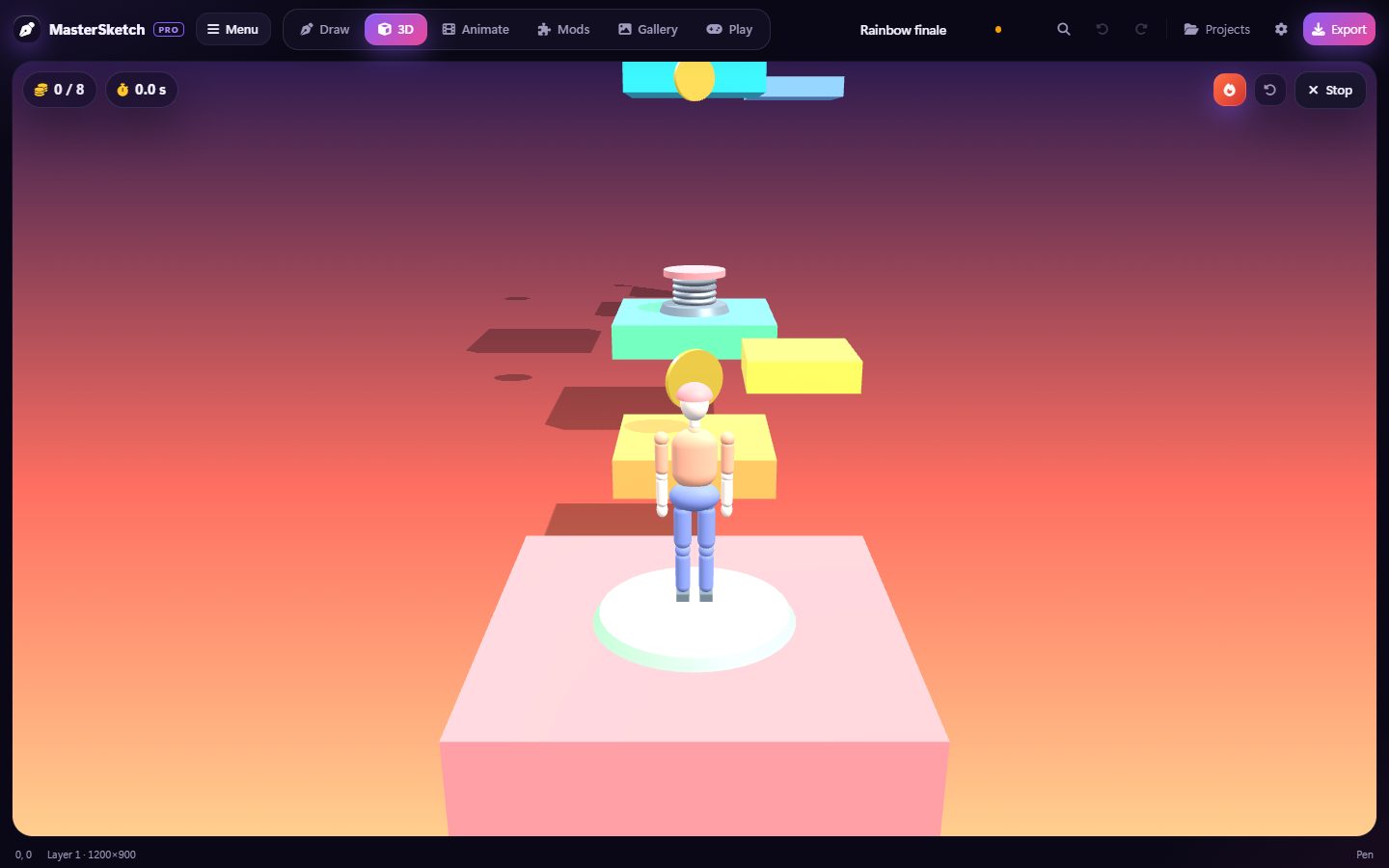
Playing the Rainbow finale level in MasterSketch
✈️ 3D Studioสตูดิโอ 3D

Fly anywhere. Play everything.บินไปได้ทุกที่ เล่นได้ทุกอย่าง

Press the plane button and fly freely around your 3D world – then jump into 10 brand-new levels.กดปุ่มเครื่องบินแล้วบินอิสระรอบโลก 3D ของคุณ – แล้วกระโดดเข้าไปเล่น 10 ด่านใหม่

WASD
  • ⬆️E or Space flies up, Q goes down, Shift goes faster and the mouse wheel sets the speed.E หรือ Space บินขึ้น Q บินลง Shift เร็วขึ้น และลูกกลิ้งเมาส์ปรับความเร็ว
  • 📱On phones and tablets: a joystick and up/down buttons.บนมือถือและแท็บเล็ต: มีจอยสติ๊กและปุ่มขึ้นลง
🍬Easyง่ายCandy gardenสวนขนมหวาน
🌉Easyง่ายWobbly bridgeสะพานโยกเยก
🏙️MediumปานกลางSpring cityเมืองสปริง
🪐MediumปานกลางPlanet hopกระโดดดาวเคราะห์
⚠️MediumปานกลางSpike alleyตรอกหนาม
🌳MediumปานกลางForest climbปีนป่า
🛗HardยากSky elevatorsลิฟต์ลอยฟ้า
🧭MediumปานกลางCoin mazeเขาวงกตเหรียญ
🌙HardยากMoon runวิ่งบนดวงจันทร์
🌈Expertผู้เชี่ยวชาญRainbow finaleด่านสายรุ้งสุดท้าย
Verifiedยืนยันแล้ว

Verified creationsผลงานที่ยืนยันแล้ว

Every painting, animation, model and mod shared in MasterSketch is checked by the team first. The best ones get a blue Verified badge and rise to the top.ภาพวาด แอนิเมชัน โมเดล และม็อดทุกชิ้นที่แชร์ใน MasterSketch จะถูกทีมงานตรวจก่อน ผลงานเยี่ยม ๆ จะได้ป้ายยืนยันสีฟ้าและขึ้นไปอยู่ด้านบน

🧊 3D Workshopเวิร์กช็อป 3D

Models made by everyoneโมเดลที่ทุกคนสร้าง

Spin them, try them, add them to your own world. The most-used models climb the Top models board.หมุนดู ลองเล่น แล้วเพิ่มลงในโลกของคุณ โมเดลที่ถูกใช้มากที่สุดจะขึ้นอันดับยอดนิยม

✦ And so much moreและอีกมากมาย

Little things kids loveของเล็ก ๆ ที่เด็ก ๆ ชอบ

🌈12 fun brushesแปรงสนุก 12 แบบ

Hearts, confetti, lightning, washi tape, drippy paint…หัวใจ กระดาษสี สายฟ้า เทปวาชิ สีไหลหยด…

🐾Stampsตัวปั๊ม

Googly eyes, crowns, sunglasses and paw prints.ตาโปน มงกุฎ แว่นกันแดด และรอยเท้าสัตว์

🖍️Coloring & lessonsระบายสีและบทเรียน

Color pictures or learn to draw them part by part.ระบายสีภาพ หรือฝึกวาดทีละส่วน

🔥Daily challengeภารกิจประจำวัน

A new drawing idea every day – keep your streak.ไอเดียวาดภาพใหม่ทุกวัน รักษาสถิติไว้ให้ได้

🎨Draw & guessวาดแล้วทาย

A party game for friends and family.เกมปาร์ตี้สำหรับเพื่อนและครอบครัว

🎵Boom Box

Play music from YouTube while you draw.เปิดเพลงจาก YouTube ระหว่างวาดรูป

💬Talk to the teamคุยกับทีมงาน

Send bugs and ideas, and read the team's answers.ส่งปัญหาและไอเดีย แล้วอ่านคำตอบจากทีมงาน

🌏5 languages5 ภาษา

English, Thai, Spanish, Japanese and Chinese.อังกฤษ ไทย สเปน ญี่ปุ่น และจีน

⬇ Free downloadดาวน์โหลดฟรี

Get MasterSketch 6.1ดาวน์โหลด MasterSketch 6.1

Free on every device. No account, no ads.ฟรีทุกอุปกรณ์ ไม่ต้องสมัคร ไม่มีโฆษณา

Android

Phones and tablets · Android 7 or newer · 853 KBมือถือและแท็บเล็ต · Android 7 ขึ้นไป · 853 KB

Download APKดาวน์โหลด APK

iPad & iPhone

Install from Safari: Share → Add to Home Screen. Works offline.ติดตั้งจาก Safari: แชร์ → เพิ่มไปยังหน้าจอโฮม ใช้ออฟไลน์ได้

How to installวิธีติดตั้ง

Windows

Windows 10 & 11 · 9.5 MB · just open it, nothing to installWindows 10 และ 11 · 9.5 MB · เปิดใช้ได้เลยไม่ต้องติดตั้ง

Download for Windowsดาวน์โหลดสำหรับ Windows

Mac

macOS 10.13 or newer · 1021 KB · unzip, then right-click → Open the first timemacOS 10.13 ขึ้นไป · 1021 KB · แตกไฟล์ แล้วคลิกขวา → เปิด ในครั้งแรก

Download for Macดาวน์โหลดสำหรับ Mac
No download needed:ไม่ต้องดาวน์โหลดก็ได้: MasterSketch runs in any modern browser.MasterSketch ใช้งานได้ในทุกเบราว์เซอร์สมัยใหม่Open in browserเปิดในเบราว์เซอร์Single-file version · 2.4 MBไฟล์เดียวแบบออฟไลน์ · 2.4 MBInstall appติดตั้งแอป
FAQ

Questions people askคำถามที่พบบ่อย

Is it really free?ฟรีจริงไหม?

Yes. No account, no ads, no subscription.ฟรีจริง ไม่ต้องสมัครสมาชิก ไม่มีโฆษณา ไม่มีค่ารายเดือน

How do I make an animation?ทำแอนิเมชันอย่างไร?

Tap Animate at the top. Draw on frame 1, press + to add the next frame and draw it a little different – the faded red picture shows the frame before. Press play to watch it move.แตะ แอนิเมชัน ที่ด้านบน วาดบนเฟรมที่ 1 กด + เพื่อเพิ่มเฟรมถัดไปแล้ววาดให้ต่างไปนิดหน่อย ภาพสีแดงจาง ๆ คือเฟรมก่อนหน้า กดเล่นเพื่อดูภาพเคลื่อนไหว

Can I add my own sounds?ใส่เสียงของตัวเองได้ไหม?

Yes. Pick a frame and tap a sound effect, press Record to use your voice, or upload a sound file. Add music too – export a video to keep all the sounds.ได้ เลือกเฟรมแล้วแตะเสียงเอฟเฟกต์ กด อัดเสียง เพื่อใช้เสียงของคุณ หรืออัปโหลดไฟล์เสียง ใส่เพลงก็ได้ แล้วส่งออกเป็นวิดีโอเพื่อเก็บเสียงทั้งหมดไว้

How do I fly in 3D?บินในโลก 3D อย่างไร?

In the 3D Studio press the plane button (or V). Use W A S D to fly, E or Space to go up, Q to go down and Shift to go faster. Drag to look around and press Esc to stop.ในสตูดิโอ 3D กดปุ่มเครื่องบิน (หรือ V) ใช้ W A S D เพื่อบิน E หรือ Space เพื่อขึ้น Q เพื่อลง และ Shift เพื่อเร็วขึ้น ลากเพื่อมองรอบ ๆ และกด Esc เพื่อหยุด

What does the blue Verified badge mean?ป้ายยืนยันสีฟ้าหมายความว่าอะไร?

The MasterSketch team looked at it and liked it. Verified creations are shown first in the Gallery, the Workshop and Mods.ทีม MasterSketch ตรวจดูแล้วและชอบผลงานนี้ ผลงานที่ยืนยันแล้วจะแสดงก่อนในแกลเลอรี เวิร์กช็อป และม็อด

Where are my drawings saved?ภาพวาดของฉันถูกบันทึกไว้ที่ไหน?

On your own device, inside the app. Use Projects → Download project file to keep a backup or move work to another device.บันทึกไว้ในเครื่องของคุณภายในแอป ใช้ โปรเจกต์ → ดาวน์โหลดไฟล์โปรเจกต์ เพื่อสำรองหรือย้ายไปเครื่องอื่น

Who can see what I share?ใครเห็นสิ่งที่ฉันแชร์บ้าง?

Everyone – after the MasterSketch team checks it. Use a nickname, not your real name, and never share your address or school.ทุกคน หลังจากทีม MasterSketch ตรวจแล้ว ใช้ชื่อเล่นแทนชื่อจริง และอย่าบอกที่อยู่หรือชื่อโรงเรียน

Do my old projects still open?โปรเจกต์เก่ายังเปิดได้ไหม?

Yes. 6.1 opens every project and animation from earlier versions.ได้ เวอร์ชัน 6.1 เปิดโปรเจกต์และแอนิเมชันจากทุกเวอร์ชันก่อนหน้าได้

Ready to make something amazing?พร้อมสร้างผลงานสุดเจ๋งแล้วหรือยัง?

Open it in your browser right now – it's free.เปิดในเบราว์เซอร์ได้เลยตอนนี้ – ฟรี